
For a quick market scan, use an online rate aggregator like mortgages.co.nz or Canstar NZ. For side-by-side cost modelling, pair that with a dedicated loan calculator. For anything involving a low deposit, complex income, or non-standard credit, skip the tools and call a mortgage adviser like Mortgagemanagers directly.
Here is how that plays out across the most common borrower situations:
- First home buyer: Start with Canstar NZ for a scored overview of features and rates, then check deposit requirements before assuming you qualify for advertised rates.
- Refinancer: Use mortgages.co.nz for a fast rate comparison across multiple lenders, then run a calculator to confirm whether break fees make switching worthwhile.
- Low deposit borrower (under 20%): Go straight to a mortgage adviser. Online tools rarely surface Kāinga Ora First Home Loan eligibility or lender-specific low-deposit criteria accurately.
- Property investor: Use a calculator to model interest-only versus principal-and-interest repayments across different terms, then verify with an adviser who knows lender serviceability rules for investment lending.
- Complex credit or self-employed: Stop at the aggregator stage. Comparison tools cannot assess lender appetite for non-standard income or adverse credit history.
The rule of thumb is simple: tools are for orientation, advisers are for decisions.
Table of Contents
- Which NZ home loan comparison tools suit your needs?
- How each tool sources its NZ rates and where each one shines
- How do you choose the right mortgage comparison tool?
- How to compare two home loans side by side using a calculator
- NZ mortgage context: the numbers and rules that underpin every comparison
- When should you use a tool, and when should you call an adviser?
- Key takeaways
- What comparison tools consistently get wrong
- Mortgagemanagers: adviser-led home loan help across New Zealand
- Useful sources for live NZ figures and tool verification
Which NZ home loan comparison tools suit your needs?
| Tool | Best for | Data freshness | Lenders compared | What is compared | Extra tools | Ease of use | Cost | Privacy required |
|---|---|---|---|---|---|---|---|---|
| mortgages.co.nz | Fast rate check across major NZ lenders | Regularly updated (not live feed) | Major NZ banks and some non-bank lenders | Headline rates, loan types | Basic repayment calculator | Very easy | Free | Minimal for rate check |
| Canstar NZ | In-depth product scoring and feature comparison | Periodic research updates | Banks and selected lenders | Rate, fees, features, offset, redraw | Star ratings, comparison tables | Easy | Free | Email for some features |
| Loan Market calculator | Scenario cost comparison and repayment modelling | Rates entered manually or updated by advisers | Adviser-sourced lender panel | Repayment amounts, loan cost | Repayment, split loan, affordability | Moderate | Free (adviser gated for quotes) | Name and contact for quotes |
| Mortgagemanagers | Personalised advice, full application, complex cases | Live lender access via adviser | Full lender panel including non-bank | Rate, fees, features, eligibility, serviceability | Full scenario modelling with adviser | High-touch | Free to borrower (commission-based) | Full financial picture required |
A few important caveats to keep in mind:
- Aggregator tools typically show standard advertised rates, not the special discounted rates that require conditions like 20%–30% equity. The gap between the two can be meaningful.
- Loan Market’s calculator produces the most useful output when an adviser pre-populates lender-specific rates, so results vary depending on how recently those figures were entered.
- Mortgagemanagers requires a full financial disclosure to provide personalised quotes, which is appropriate given the regulated advice it delivers.
How each tool sources its NZ rates and where each one shines

mortgages.co.nz
mortgages.co.nz aggregates publicly advertised rates from major New Zealand banks and a selection of non-bank lenders. It is best used as a first stop: you can scan the market in under two minutes without entering personal details. The site compares headline fixed and floating rates across standard loan types, which makes it useful for refinancers who want a quick read on whether their current rate is competitive.
The limitation is that it shows standard advertised rates. The RBNZ B20 series distinguishes these from special rates, which are lower but conditional on equity thresholds and product requirements. If you have 30% equity and a clean credit profile, the rate you can actually negotiate may be noticeably lower than what mortgages.co.nz displays.
Canstar NZ
Canstar NZ applies a research-based scoring methodology that weights interest rates alongside fees, features, flexibility, and customer service. Its star ratings give you a structured way to compare products beyond the headline number, which is genuinely useful when you are weighing offset accounts, redraw facilities, or split loan options. The scoring is updated periodically rather than in real time, so treat it as a quality benchmark rather than a live rate feed.
One thing Canstar does well is surfacing fee structures that aggregators often omit. Annual fees, application fees, and break costs can shift the true cost of a loan considerably over a five-year term.
Loan Market
Loan Market’s comparison calculator is adviser-supported, meaning the most accurate outputs come when you work with a Loan Market broker who inputs current lender rates. As a standalone self-service tool, it is useful for modelling repayment scenarios and understanding how loan term or repayment frequency affects total interest paid. For personalised quotes, you will need to share contact details and engage with an adviser.
Mortgagemanagers
Mortgagemanagers operates as a regulated mortgage adviser, not a comparison website. That distinction matters. Under the FMA’s Code of Professional Conduct, advisers must act in your best interests, disclose how they are paid, and consider your full financial circumstances before making a recommendation. An online tool has no such obligation.
Where Mortgagemanagers adds the most value is in cases where the tool comparison breaks down: low deposit situations, self-employed income, construction loans, or borrowers with credit history complications. Advisers also have access to lender criteria that are not publicly listed, which means they can often identify options that never appear on a comparison site.
Pro Tip: Always ask a comparison site or tool whether the rates displayed are standard or special. The RBNZ B21 series tracks special rates separately, and many tools show only the standard (higher) figure. If you have sufficient equity, you may qualify for a rate that is not visible on the aggregator at all.
How do you choose the right mortgage comparison tool?
The right tool depends on what you actually need at this stage of your search. Speed and breadth are not the same thing, and neither substitutes for accuracy.
Start with these questions before you commit time to any tool:
- What stage are you at? Early research calls for a rate aggregator. Active comparison of two real offers calls for a calculator. Ready to apply or dealing with a complex situation? That is adviser territory.
- Does the tool show special rates or only standard rates? If it does not say, assume standard only.
- How many lenders does it cover? A tool that compares three banks gives you a narrow view of the market.
- Does it include fees in the comparison? Headline rate comparisons without fees can mislead you significantly, especially on shorter fixed terms.
- What personal data does it require for a free quote? A tool that asks for your full bank login details before showing you any rates is asking for more than it needs.
Red flags worth watching for:
- No methodology page or explanation of how rates are sourced
- No visible lender list
- Requires full personal financial data just to display market rates
- Rates that never seem to change, suggesting infrequent updates
- No disclosure of whether special rates are included
For a deeper look at what makes a rate genuinely competitive, the Mortgagemanagers guide on why comparing home loans matters walks through the key variables in plain language.
How to compare two home loans side by side using a calculator
A side-by-side loan comparison is only as good as the inputs you feed it. Here is a repeatable workflow.

Step 1: Gather your inputs for both loans
You need: loan amount, loan term (years), interest rate (fixed or floating), rate fix period, any annual or application fees, redraw or offset availability, repayment frequency (weekly, fortnightly, monthly), and any planned lump-sum prepayments.
Step 2: Enter identical scenarios
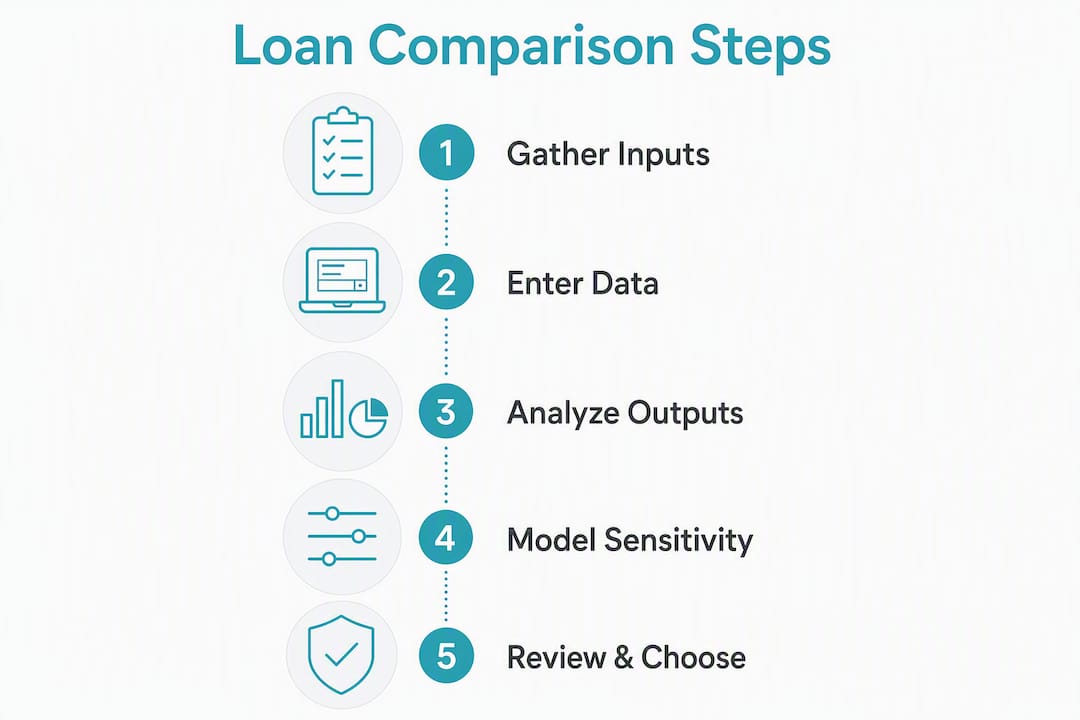
Run both loans with the same loan amount, term, and repayment frequency. Change only the variables that actually differ between the two offers. This is the “apples with apples” discipline that most borrowers skip.
Step 3: Read the outputs that matter
| Output | Why it matters |
|---|---|
| Total interest paid | The true cost of borrowing over the full term |
| Total cost (interest + fees) | Accounts for annual fees and application costs |
| Monthly repayment | Cash flow impact |
| Break-even point (fixed vs floating) | How long before one option costs less than the other |
Step 4: Model rate sensitivity
Run the same comparison at a rate 0.5% higher and 0.5% lower than quoted. This shows you how exposed you are if rates move before settlement or at refix.
The Settled.govt.nz mortgage calculator is a straightforward, government-backed tool for this kind of scenario modelling.
Pro Tip: Deposit size changes more than just your loan amount. At 20% equity you typically access standard rates; at 30% or above, many lenders offer their lowest special rates. Model the same loan at 20% and 30% deposit to see the rate and total cost difference. For a detailed breakdown of how deposit thresholds affect your options, see the Mortgagemanagers guide on NZ deposit requirements.
NZ mortgage context: the numbers and rules that underpin every comparison
Rate snapshot: The Reserve Bank of New Zealand reported the average floating mortgage rate for new customers at 6.15% and the average 2-year fixed rate at 5.69% as at June 2026. These are standard advertised averages. Special rates available to borrowers with sufficient equity will sit below these figures.
Understanding what these averages represent is important. The RBNZ publishes two separate rate series: the B20 series for standard advertised rates and the B21 series for special discounted rates. Most comparison tools draw from publicly advertised figures, which align with the B20 series. If a tool does not specify which series it uses, treat its rates as standard.
On deposit requirements, most NZ lenders expect a minimum 20% deposit for a standard mortgage. The Kāinga Ora First Home Loan scheme allows eligible first home buyers to apply with as little as 5%, but not every lender participates and income caps apply. No comparison tool currently surfaces this eligibility check reliably, which is one reason low-deposit borrowers benefit from adviser guidance rather than relying solely on an aggregator result.
Adviser conduct is also worth understanding. The Financial Markets Authority requires all mortgage advisers to be registered on the Financial Service Providers Register and to follow a Code of Professional Conduct. That code mandates acting in the client’s best interests and disclosing how advisers are paid. An online comparison tool carries no equivalent obligation. For a current read on fixed versus floating rate trade-offs in the NZ market, the Mortgagemanagers rate guide covers both options in practical terms.
When should you use a tool, and when should you call an adviser?
Three clear rules of thumb:
- Use a rate aggregator when you want a fast market scan and have a standard loan profile (20%+ deposit, stable PAYE income, straightforward property type).
- Use a calculator when you have two real offers in hand and want to compare total cost, not just headline rate. Always include fees in the calculation.
- Call a mortgage adviser when your situation involves a low deposit, self-employed or irregular income, adverse credit history, a construction or new build loan, or any lender criteria you are unsure about. Advisers carry a regulated duty of care that no tool can replicate.
On privacy: for an initial rate scan, you should not need to share your bank login credentials, IRD number, or full income details. If a free comparison tool asks for that level of data upfront, that is a red flag. Share detailed financial information only with a licensed adviser or directly with a lender as part of a formal application.
For readers who want adviser support rather than self-service tools, the next section covers what Mortgagemanagers offers and how to get in touch.
Key takeaways
The most reliable way to compare NZ home loans is to use an online aggregator for a market scan, a calculator for total cost comparison, and a regulated mortgage adviser for any situation that falls outside a standard loan profile.
| Point | Details |
|---|---|
| Start with a rate aggregator | Use mortgages.co.nz or Canstar NZ for a fast, no-personal-data market scan. |
| Run a full cost comparison | Include fees, not just headline rates, when using a calculator to compare two real offers. |
| Check standard vs special rates | Most tools show standard rates only; special rates require equity of 20%–30% and are tracked separately by the RBNZ. |
| Low deposit needs adviser input | Kāinga Ora First Home Loan allows 5% deposit for eligible buyers, but no comparison tool reliably checks your eligibility. |
| Mortgagemanagers for complex cases | Mortgagemanagers is a regulated adviser covering Auckland and all of NZ, with access to lender panels and a duty to act in your best interests. |
What comparison tools consistently get wrong
Most borrowers arrive at a comparison tool with a reasonable question and leave with a number that feels authoritative but is missing half the picture. The rate displayed is almost always a standard advertised rate, not the special rate a lender might actually offer you once your equity, income, and credit profile are assessed. That gap is not small. It can be the difference between a rate that looks average and one that is genuinely competitive for your situation.
The other thing tools cannot do is model lender appetite. Two lenders might quote the same headline rate, but one will approve your application and the other will not, based on criteria that are never published on a comparison site. Self-employed borrowers, those with a recent credit event, or anyone buying a non-standard property type will hit this wall quickly. The tool shows green; the lender says no.
What I find most telling is how often borrowers treat a comparison result as a pre-approval. It is not. It is a starting point, and a useful one, but the moment your situation has any complexity, the tool has done its job and an adviser needs to take over. The FMA’s conduct rules exist precisely because that transition matters.
Mortgagemanagers: adviser-led home loan help across New Zealand
Online tools give you a useful starting point, but they cannot negotiate on your behalf, assess lender appetite for your specific profile, or carry a legal duty to act in your best interests. Mortgagemanagers does all three.

Based in Hobsonville and serving borrowers across Auckland, West Auckland, the North Shore, and remotely throughout New Zealand, Mortgagemanagers is a locally owned mortgage advisory business. The team manages the full process: assessing your situation, identifying suitable lenders from a broad panel (including non-bank options), preparing your application, and negotiating on your behalf. The service is free to borrowers because Mortgagemanagers earns a commission from the lender on successful loan approvals, and that commission is disclosed upfront as required by the FMA.
If you are a first home buyer, refinancer, property investor, or dealing with a low deposit or complex income situation, speaking with an adviser is the most direct path to a loan that actually fits. Talk to the Mortgagemanagers team to get personalised guidance without the guesswork of self-service tools.
Useful sources for live NZ figures and tool verification
- RBNZ Housing Statistics: Live averages for floating and fixed mortgage rates for new customers. Use this to benchmark any rate a tool or lender quotes you.
- RBNZ B20: Standard mortgage rates: The standard advertised rate series. Confirm whether a comparison tool draws from this series or from special rates.
- RBNZ B21: Special mortgage rates: The conditional discounted rate series. Use this to understand the lower end of the market if you have sufficient equity.
- Kāinga Ora First Home Loan (NZ Government): Eligibility criteria, income caps, and participating lenders for the 5% deposit scheme.
- FMA: Getting financial advice: Adviser conduct rules, disclosure requirements, and how to verify an adviser’s registration.
- FMA: Mortgage advice: Specific guidance on what mortgage advisers must disclose and what questions to ask them.
- Consumer Protection: Mortgages and home loans: Borrower rights, responsible lending rules, and what to check before signing.
- Settled.govt.nz mortgage calculator: Government-backed repayment calculator for scenario modelling.
- Mortgagemanagers: Why compare home loans in NZ: Practical guide to comparison rates, loan types, and what to look for beyond the headline figure.
This article provides general information only and is not financial advice. Confirm your eligibility, current rates, and loan suitability with a licensed mortgage adviser or directly with a lender before making any borrowing decision.